User Manual
English User Manual copied from the in-app manual content.
This page contains the same English manual text and screenshots used by the Safety N3T app. The in-app manual remains available through the existing UserManualPage for English users.
1Overview
Safety N3T is a location-based social network that creates virtual communities that mirror physical geographic boundaries. The platform enables context-based messaging (see before you text/call), emergency alerts, a task marketplace, circular economy features, and advanced privacy controls. There is a ride-sharing service and a logistics service as well. The business model is focused on keeping and displaying the historical trustworthiness of the parties, which is thoroughly documented in the profile of the users. Our store is also geographically sorted, allowing to buy and sell locally first, when possible.
Key Features
- Location-based community membership with self-organizing chat rooms puts neighbors in touch without the need for prior setup or phone number exchange.
- Variable-radius S.O.S. system with abuse and misuse locks helps guarantee you are heard in an emergency, even in a remote location, while avoiding spam to hundreds of people in densely populated areas.
- AI-enhanced 911 calls create a text transcript of your emergency call for distribution to nearby users who have completed Police Officer registration, with optional distribution of a redacted version to neighbors or even bystanders.
- Hands-free secure encrypted messaging with optional password protection lets you have text, voice, and video conversations with anyone in the world without a phone number. Instead, we use a CALL: a phrase you choose as your new “number”.
- Multi-scale, multi-market store with delivery-company integration enables commission-free transactions where ALL of the profit goes to sellers and delivery companies.
- Also commission-free, ride sharing and logistics services send ALL of the profit to drivers and couriers and can prioritize gigs that drive them back home when they intend to do so.
- AI-powered feed algorithm you control through data filters or concept and tone boosters suggests content you actually want to watch by serving as a hub for all video platforms, but only for content our users watch. See “Uploading your YouTube/Twitch/TikTok Watch History to Safety N3T.”
- Map Page displays other users’ locations with privacy-first design, letting you know where your people are without giving away your own location to unauthorized users.
- Optional unusual location, check-in, and emergency monitoring for relatives and loved ones lets selected devices send critical notifications that can bypass the phone’s Do Not Disturb system.
- Task Market, parking-space rental, one-tap home services and supply delivery requests, a communication system for caravans or dispersed travelers, and other exciting features will be integrated as our user base grows.
About the Blue Location Bar on iPhone (iOS)
Some iPhone users notice a blue bar or pill at the top of the screen while Safety N3T is in the background and worry that the app is draining their battery or using a lot of data. It is not — here is what that indicator really means.
What it is: The blue bar is Apple's own system indicator, shown by iOS whenever any app is actively using your location while it is not on screen. It is purely informational: it keeps you aware of which app is using location. It does not mean the app is doing anything heavy, hidden, or unusual.
Battery and data impact: Background location updates use very little energy. Safety N3T asks iOS for efficient, movement-based updates instead of constantly polling GPS, and each update is only a tiny piece of data (coordinates), so the effect on your battery and data plan is minimal. The blue bar signals that location is in use — not that battery or data consumption is high.
Why Safety N3T shows it: iOS offers two location permission levels: “While Using the App” and “Always.” Safety N3T deliberately asks only for the more private “While Using the App” permission and never requests “Always” access. To keep live location sharing with your Network on the Community Map and the safety and monitoring features working when you switch apps or lock your phone (if you have chosen a sharing mode that allows this), iOS requires the blue indicator to stay visible. The blue bar is the trade-off Apple makes for the more privacy-friendly permission: you keep tighter control over your location, and iOS keeps you informed whenever it is used.
This is normal: The blue bar is expected, standard iOS behavior for any app that uses background location under the “While Using the App” permission. It is not a bug, a malfunction, or a sign of excessive battery or data use. If you prefer not to see it, choose a more restrictive location-sharing mode in your map privacy settings and the app will use location only while it is on screen.
2Getting Started
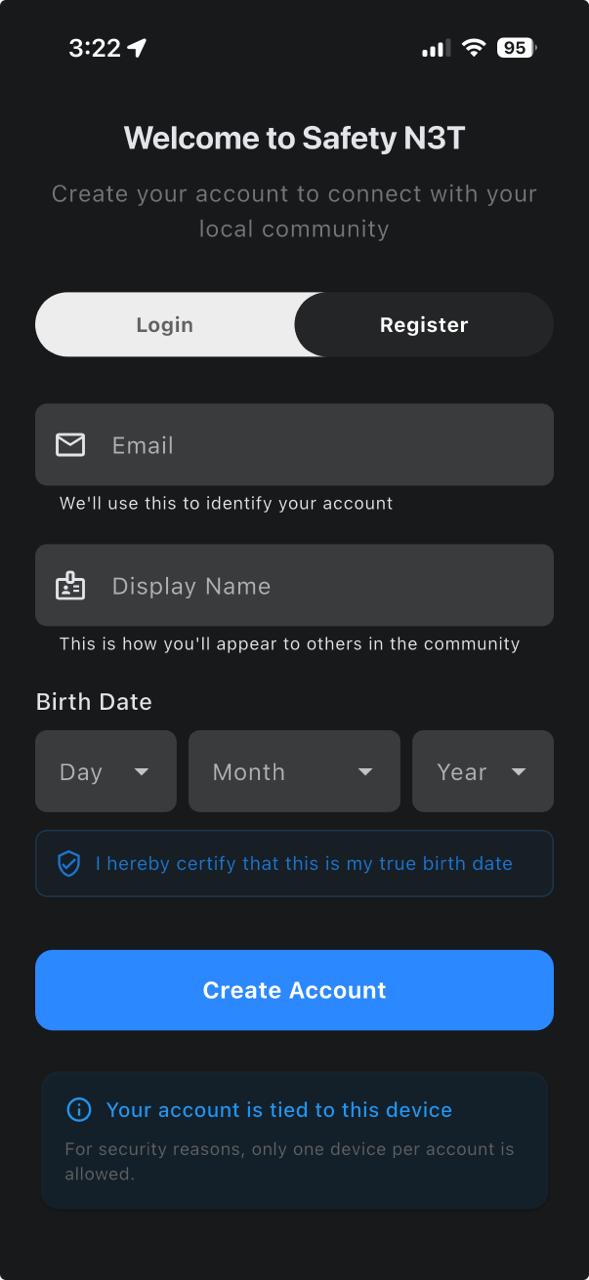
Account Creation
Your account is automatically linked to your device using secure hardware fingerprinting—no passwords required. This ensures each account is tied to a real device that you own, and this prevents fake accounts and account takeovers. Minimum required data: Only an email account and a display name.
Setting Up Your Profile
- Add a profile photo by tapping the picture window.
- Change your display name or add bio / interests (optional).
- Add an optional email for display in your profile. (Can be different from the registration email, which is kept private.)
- Select your profession to convey your expertise to the community.
- Phone and location are optional, and all fields can be restricted by permission levels.
Verifying Your Residence
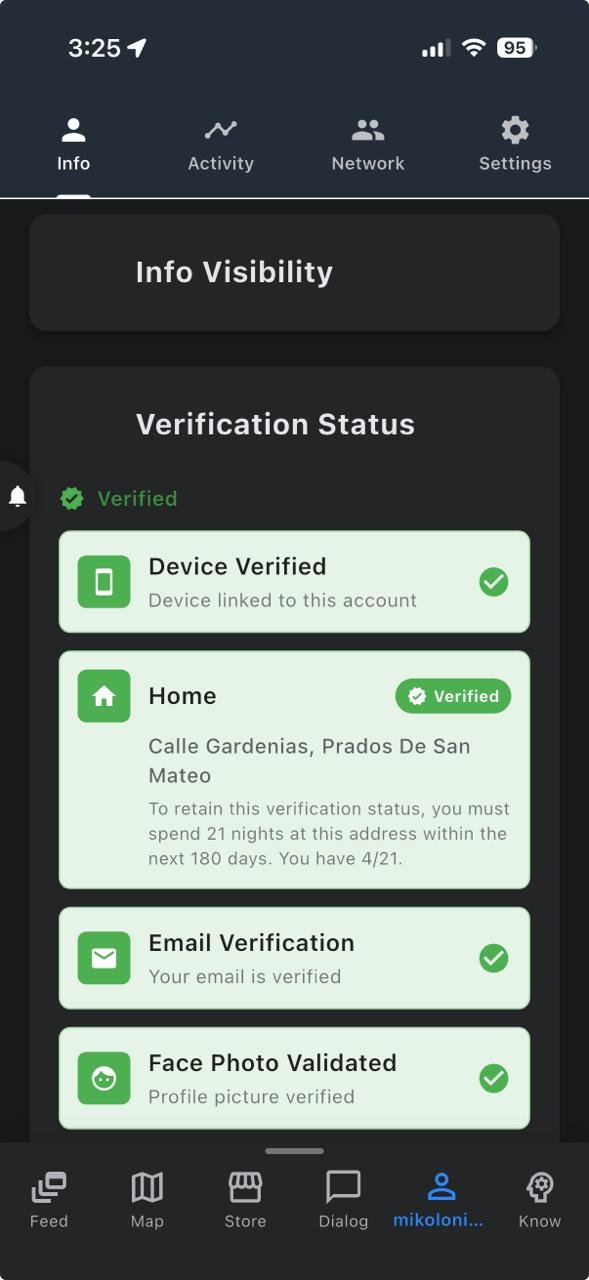
To fully become a community member, you will need to verify your residence. This confirms that you actually live in a community and thus additional localized features are unlocked. Simply leave the app open during the night when you go to sleep for 21 nights to verify your residence. Remember: You can have multiple verified residences and get neighbor rights in each one of them.
4News Feed
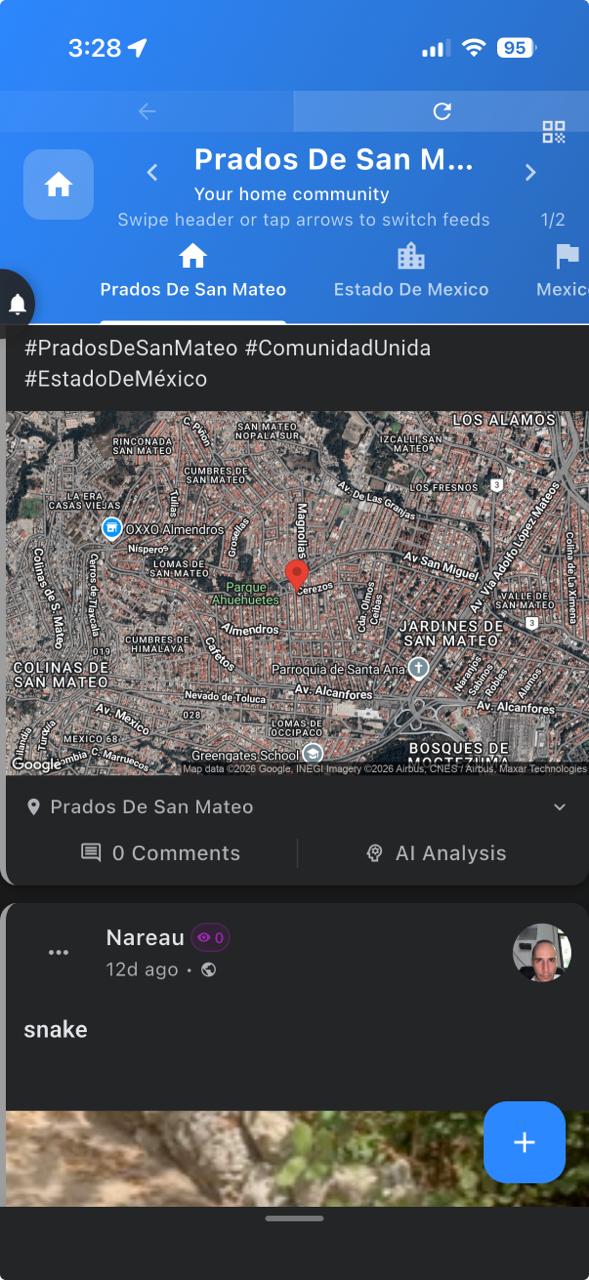
All users can see the news feed of their current location, but only members of that community can post. When you verify your residence, you become a member of that community, and you get write access to the local news feed. Each News Feed is organized into four geographic levels, allowing you to see content from only your neighborhood, state, country, or the complete global news.
Feed Levels
- 🏘️ Neighborhood: Posts from your immediate community (by name).
- 🏙️ State/Region: Content from your state + all its neighborhoods.
- 🏴 Country: National-level posts + all its states.
- 🌍 Global: Absolutely everything from everywhere.
You can post from all 4 scale levels and the changing color of the post button reflects the level you are posting from. If you post from the Global level, your post will be available to all users but will only appear at the Global level. Conversely, if you post from the Local Community level, your post will also be available to everyone but will appear in absolutely all levels, unless you turn the private post toggle on. Feed Levels cascade up and never down. This means that if you publish a post at the State level, it will appear in the State, National, and Global feeds, but not in the Local Community feed.
Creating a Post
- Tap the + button to create a new post.
- Add text, (true)photos, (true)videos, audio recordings, or weblinks to the feeds. True is a special kind of media that has a No Alterations Warranty (cannot be edited, cropped, or filtered).
- AI automatically analyzes what you publish, searching for the concepts and the tone.
- The analysis is used to sort the posts in a way that meets your interests and mood. You can adjust your feed preferences in the Know Thyself section of the Know Page. (See Knowledge Center).
Interacting with Posts
- Swipe the feed up & down for new content, and left & right for similar content!
- 👍 Like / 👎 Dislike: Likes make similar content more likely to appear in the feed. Dislikes make content less likely to appear in the feed.
- ❤️ Love / 🔥 Fire (Anger), 😊 Happy / 😢 Sad, and 🎭 Hahaha / 😕 Confused are mutually exclusive pairs that lets other users filter posts by reaction thresholds.
- ✓ True / ✗ False lets the user mark content as real content or as generated content so that other users can filter out generated content or real content equally by applying a filter.
- 💬 Comment: Join the discussion
- 🔗 Share: or submit this post to someone else.
Built for privacy
- You cannot see the identity of the author of a post until you tap on the post.
- If you tap on a post, the author becomes visible, but then you will appear in their network list too.
- This ensures you always know who reads your posts and checks out who you are.
- Of course, you can still read everything anonymously...
- As long as you don't try to find out the identity of the authors.
- Mark your post as private if you do not want it to appear in the greater scales, and select the audience that you want to share it with if it should not be public.
Hiding, PostClass Labels, and Subject Suppression
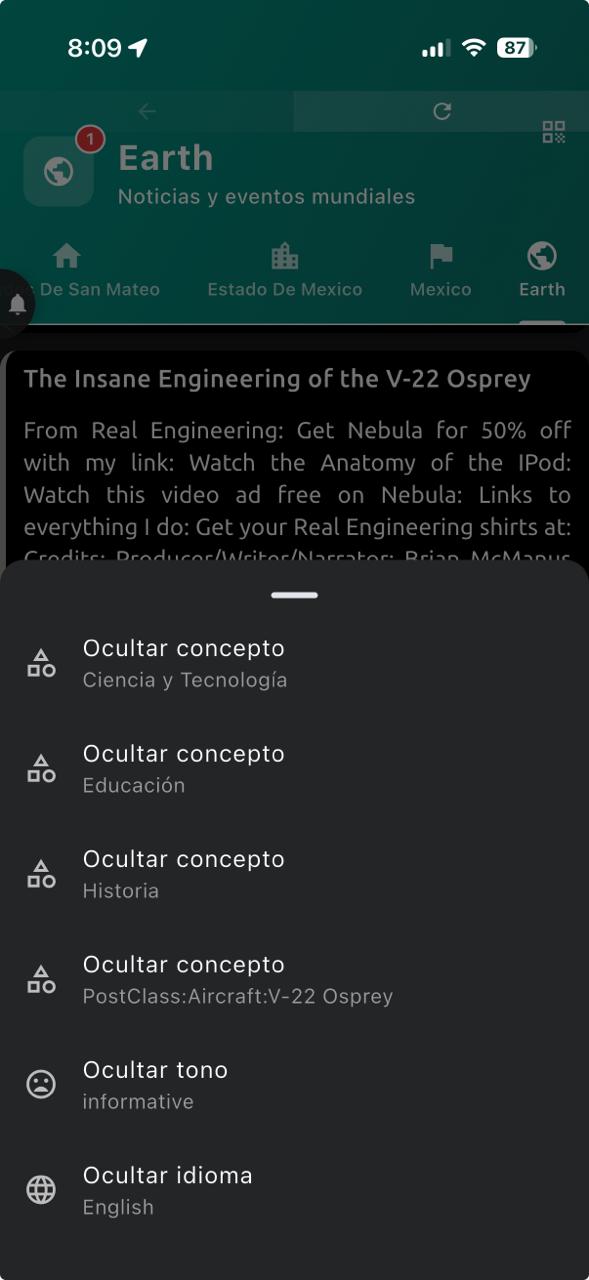
- 🙈 Hide what you do not want to keep seeing: Long-press a post to hide that post, its channel, a tone, a language, or a concept. The feed updates right away, so you can clean up unwanted content without closing or refreshing the app.
- 🏷️ Clear subject labels: All posts include simple subject classification labels such as news, politics, a band, a person, or another main topic. These labels use a consistent English name starting with PostClass: while the resst of the concepts can be translated across different languages.
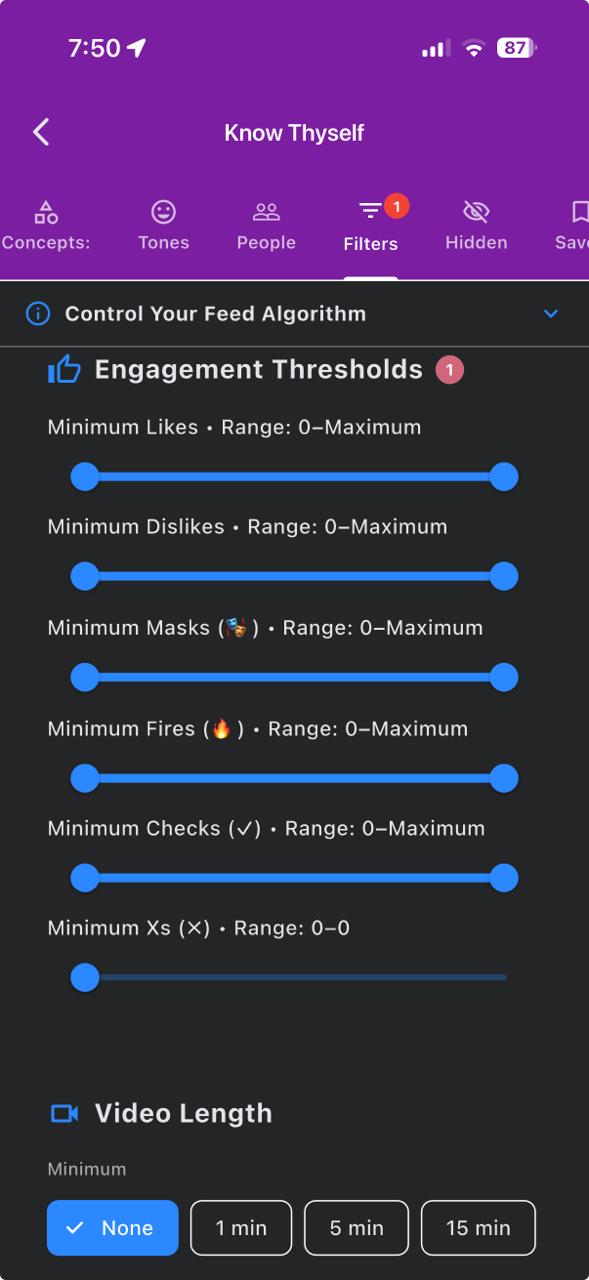
- 🛑 Turn off a whole subject: Hiding one of these subject labels works like a practical off switch for that topic. For example, if you hide a politics subject label, future posts classified under that subject will be kept out of your feed. To ensure you are viewing only non-generated or verified content, go to Know > Know Thyself > Engagement Thresholds and set the False Reports (✗) filter range maximum to 0; posts with any False report are excluded.
Sharing Posts with Share Codes
Every post can be referenced with a short Share Code (for example N3T:A3F7K9), which makes it easy to point other people to an exact post.
- 🔗 Copy a Share Code: Open a post's options menu and choose Copy Share Code. If the post does not have a code yet, one is generated for you automatically.
- 🔍 Open with Share Code: Tap the QR-code button at the top of the News Feed and choose Open by Share Code. Enter the code you received and the app takes you directly to that post.
- 📋 Paste with Share Code: From the same QR-code button, choose Paste by Share Code to publish the referenced post into the feed level you are currently viewing, so your community can see it too.
Mayor, Governor, and President Modes
The News Feed includes three official communication modes, one for each geographic level: Mayor Mode for your community (blue), Governor Mode for your state (green), and President Mode for your country (orange).
- These modes give you a direct line of communication with the officeholders of the jurisdictions where your home is located, but the officeholders need to claim their role in the app to see the posts.
- Emergency Alerts triggered at these jurisdictions cascade up to the larger jurisdictions: Mayors see all the alerts from their city/municipality, Governors see all the alerts from their state, and the President sees the alerts from the whole country.
- The posts in these modes are moderated and/or rephrased by AI so that only true proposals or complaints are published in a civic manner.
- Long-press the scale tabs in the feed to access Mayor, Governor, and President mode. Publish constructive proposals in a civic tone and your publication should pass unedited.
- All posts and their conversations are public by default in the official modes.
5Community Map
The Community Map is your central hub for real-time location-based services including user visibility, emergency alerts, parking, storage, services, missions, tasks, deliveries and mobility.
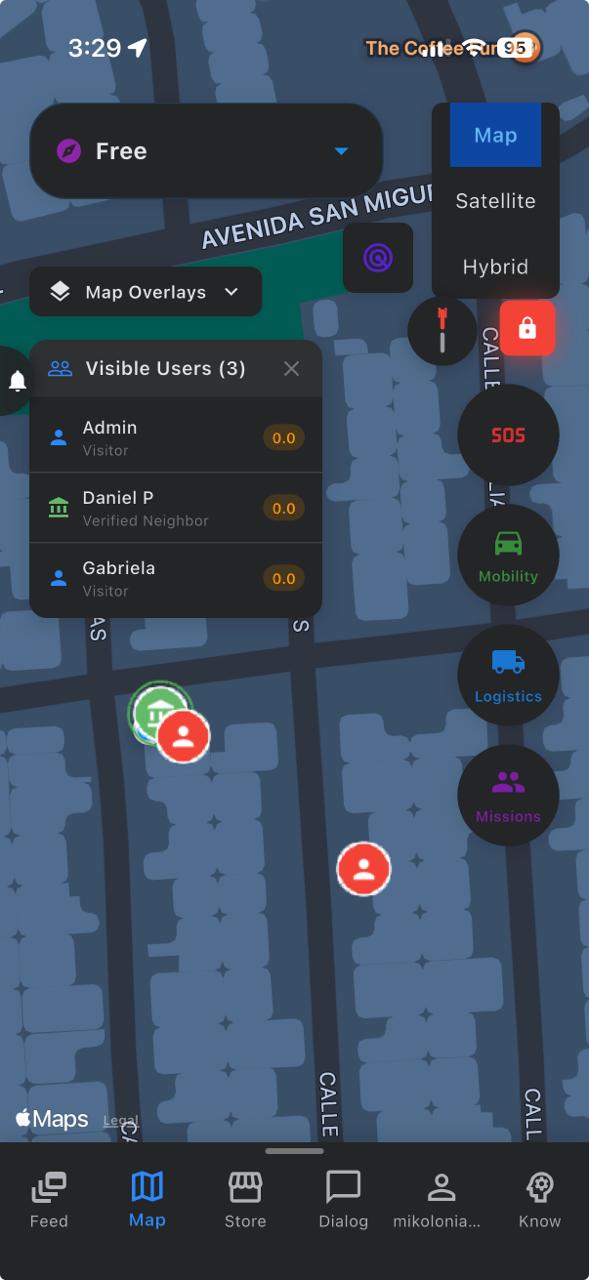
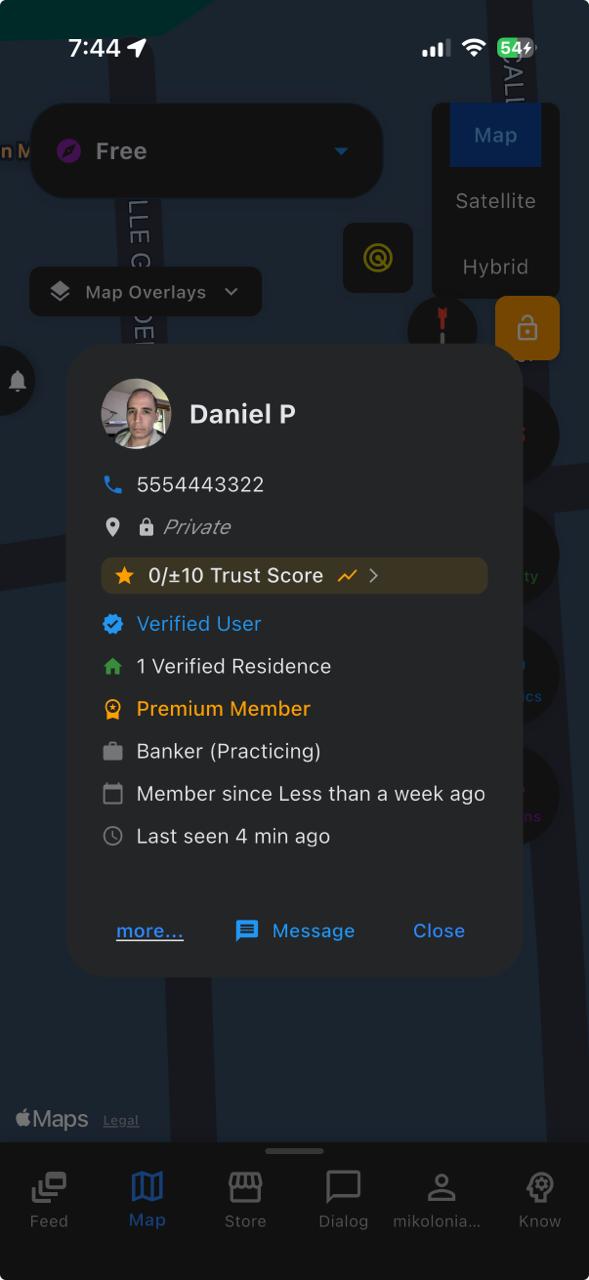
Tap the user markers on the map to see their profile and communicate with them. Some users will let you see their profile and be open to communicate with you while others will not.
Map Features
- 🚨 Emergency: View and create community alerts: Police, Medical, Fire, Armed Attacker, Flood, Tornado, Missing Person, Person Found, Missing Pet, Pet Found, Aggressive Dog(s), Wild Animal(s), Object Lost, Object Found, Gas Leak, Water Leak, Traffic Accident, Pothole.
- 🅿️ Parking & Storage: Find and post available parking or storage spots.
- 📋 Tasks: Publish and apply to local help requests in exchange for compensation.
- 🔧 Services: Browse and call local service providers with one tap.
- 🆘 SOS: Send emergency assistance requests to surrounding users.
- 🚗 Mobility: Request rides from community drivers.
- 📦 Logistics: Send & receive packages with local delivery.
- 🎯 Missions: Join or create group missions to specific locations.
- 📍 Quick Map Navigation: Select between your communities in the selector or use NAVIGATE mode to auto-align the map with the actual orientation of the streets.
- 🧅 Map Overlays Menu: Historical Emergency Alerts, Inner Circle Location History Trails, Parking & Storage, Task Market, Identified Communities, User Labels and People. All the information at your fingertips but only if you want to see it.
Navigation and Visibility Tools
- 🧭 Mode/Residence Selector and NAVIGATE mode: The dropdown selector at the top of the community map is the mode/residence selector. Free mode is the default. Changing the mode to NAVIGATE aligns the map to your current orientation and disables auto-geocoding so that you can trigger geocoding manually.
- 🗺️ Second NAVIGATE mode: If you tap NAVIGATE a second time, it switches to a lighter navigation mode that keeps the map centered on your current location without rotating the map. Select Free mode or any verified residence to disable NAVIGATE mode.
- 🎯 User Highlighting Tool: Stand out from the crowd when you need someone to find you. The target button under the mode selector lets you highlight yourself momentarily on everyone else's map view. Long-tap the target button to select the highlight color.
6Messaging
The messaging system provides secure, encrypted communication with other community members. Messages are end-to-end encrypted for complete privacy. Safety N3T offers multiple chat types for different communication scenarios.
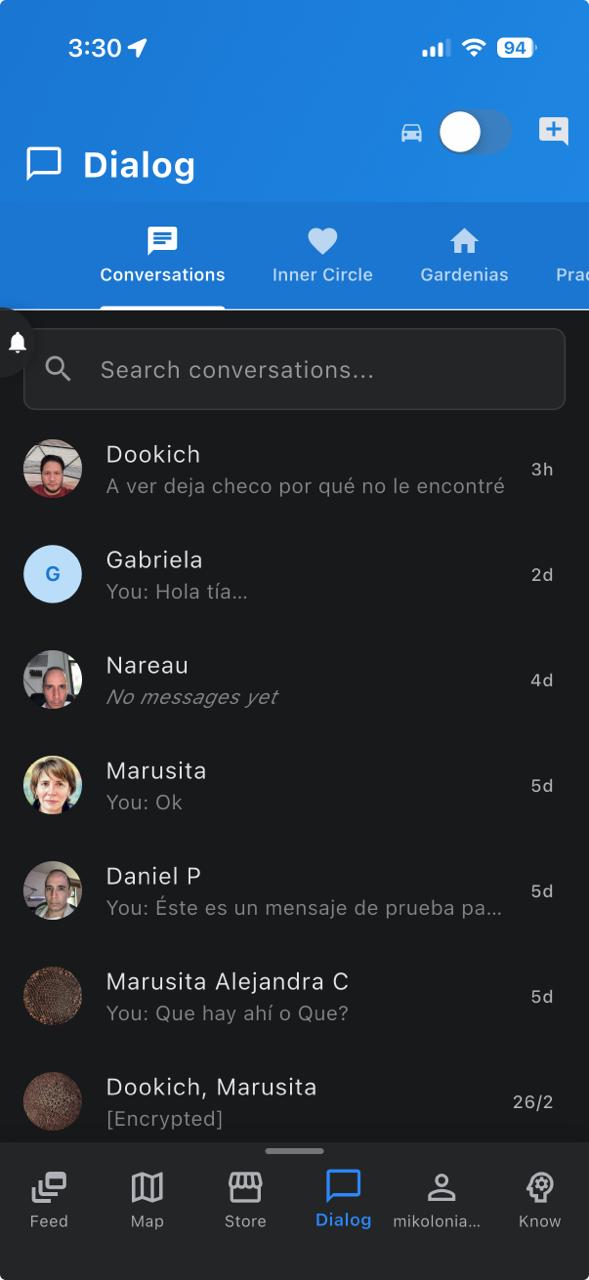
Core Message Features
- 🔒 End-to-end encryption for all messages.
- 📷 Send photos, videos, and audio recordings privately.
- ↩️ Reply to specific messages.
- ✓ Read receipts to show when messages were seen
- 📄 Share documents (PDF, DOC, XLS, TXT, etc.) and media files with peace of mind. Everything is scanned for malware!
- 🚗 Use Driver Mode for hands-free messaging while driving or chilling out.
- 🎨 Personalize your conversations with custom colors, fonts and font sizes.
- 🖌️ Long tap on the background of the message to turn it into a shared drawing board.
- 💬 Save phrases for quick text insertion and expand the text input area for a wider typing perspective.
🏠 Street Club Chat
Street Club Chat automatically connects you with neighbors on your street. This is your closest community circle for immediate neighborhood coordination and response.
- Automatically joined based on your verified residence address.
- Share local updates: package deliveries, street events, unusual activity alerts.
- Coordinate with immediate neighbors for block parties or for emergencies.
- Launch polls to know what your neighbors think about important issues. The outcomes become a record available to all the members of the chat.
- Resolve disputes with the help of AI. Let us work things out as modern adults: Ask Claude who is right and who is wrong. LLMs are a great source of common sense and impartiality, so they are ideal for this.
- Access: Navigate to Dialog → Street Club tab
🚶 Walk Talk
Walk Talk is a semi-anonymous group chat for verified users who are away from home. It enables users to connect with people in their surroundings when they are away from their residence.
- Every community has its own Walk Talk group that you can join simply by being there.
- The identity of users is only visible when they send a message.
- Incoming users cannot see past messages for enhanced privacy.
- All messages are automatically deleted after 7 days.
- Requires a verified residence (but you must be away from it to access Walk Talk).
- Access: Navigate to Dialog → Walk Talk tab (only visible when away from home)
🏘️ Community Chat
Community Chat expands your reach to the broader neighborhood or subdivision. Connect with community members beyond your immediate street.
- Discuss community-wide topics: HOA meetings, local events, recommendations and warnings.
- Requires a verified residence in the community. Do not hesitate to report fake accounts from the Street Club and Community chats, as this is our first line of defense against scammers and fake users.
- Access: Navigate to Messages → Community tab
⭐ Inner Circle Feed
The Inner Circle Feed shows private posts from your most trusted contacts and they can meet each other in the comments section.Your Inner Circle consists of people you have promoted to your highest trust level. Therefore, the social connections that will be made in this feed are expected to be special too.
- Same functions as the main feed but adapted to trusted connections.
- See select status updates from Inner Circle members only
- Requires mutual Inner Circle promotion (both users must add each other as IC)
- Access: Navigate to Dialog → Inner Circle tab.
👥 Group Chat
Create custom group conversations with any combination of community or external members. Perfect for organizing events, projects, interest groups or just your friend groups.
- Create rooms with custom names and avatars
- Add or remove members (only group creator can add/remove members)
- Mute notifications for specific groups / users
- Access: Dialog → tap + button → Create Group
🏢 Condo Security & Management
For residents of condominiums and managed properties, this feature provides direct communication channels with building security and property management.
- Direct line to building security for visitor approvals and emergencies
- Both Security and Management groups are in a multi 1:1 format. This means that security and management representatives can have multiple 1:1 conversations in the same chat window without overlapping or mixing up messages. Only the managed side can see what everyone else is saying, while individuals can only see their own conversation. This is to ensure privacy and prevent sensitive information from being shared accidentally.
- Receive building-wide announcements from the management chat and generate QR codes in the security chat for visitor access.
- Requires residence verification in a participating condo/building
- Access: Dialog → Building Services tab (only visible for condo residents)
🚗 Driver Mode Messaging
When you activate Driver Mode (Hands-free mode), specialized messaging features become available for safe, typeless communication while driving or resting.
- Quick-reply buttons for marking your messages as questions or exclamations.
- Voice message transcription for hands-free writing and reading.
- Automatic activation when a car ride is detected.
- Repeat last message or your own answer out loud before sending.
- Access: Enable Driver Mode (Car Toggle) in Dialog Page → then use the chat screens with your voice.
📞 The CALL
The CALL is a new concept introduced by Safety N3T. It is basically a telephone number that is made with text instead of numbers. It enables users to call directly and get in touch without requiring users to see each other on the map first. Personalize your CALL as soon as you join Safety N3T, to secure it before someone else takes it.
- 12 to 21 characters long, made of numbers and letters.
- Always private, unless you willfully share it with someone, just like a phone number.
- Much easier to remember than a phone number and permits the attachment of meaning in a personal slogan.
- Can be contained in other CALLs, so try to consume the full 21 characters to make it truly unique.
- A perfect opportunity to express your personality and creativity, or to simply show off your flyest palindrome.
🔔 Inner Circle Activity Notifications
Long tap the conversations of the Dialog Page to stay informed about the whereabouts and status updates of your Inner Circle members. Receive notifications when they get home, leave home, when they reach their next location and when they leave.
- 🏠 "Arrived Home": Know when Inner Circle members arrive at their residence.
- 🚶 "Leaving Home": Get notified when someone leaves home.
- 📍 "Stationary": See when someone has been in one place for a while after a journey.
- 🚗 "In Transit": Track when they start moving again after being stationary.
- Requires: Mutual Inner Circle membership + location sharing permissions.
- Configure: Profile Page → Network Tab → Select Inner Circle in the 3-dot menu of the target user.
- Manage your Inner Circle Permissions to monitor your own activity: Long-tap your self-conversation → Inner Circle Notification Permissions.
7Store & Marketplace
The way a zero-commission store works is as follows: you, the seller, are supposed to profit from your sales. We, the platform, are supposed to let you do that without taking a percentage of your sales or absorbing any of your return expenses. This means that this kind of store is not for every seller. If you already sell on other platforms and have few returns, this product is specifically ideal for you. On the other hand, if you sell second-hand items that have issues you don't report upfront, Your Personal Store is not ideal in that case. The platform takes the risk of absorbing your first return because buyers have a money-back guarantee for 30 full days. Returns unavoidably generate expenses that the seller is expected to settle before being able to continue making a profit. Thus, the expenses generated by returns will be automatically deducted from your next sales until the amount due is settled. Also, there is no such thing as free shipping, so we offer a variety of shipping methods that will be included in the price breakdown. As a buyer, choose the one that best fits your budget, but keep in mind that this platform is intended to offer a local market experience that should be preferable to long-range transactions. So, for many of your purchases, self-pickup and platform delivery will make more financial sense than using the delivery companies. Choose the 'Nearest First' sort to get the options that are closest to your location. Also, note that platform delivery is programmed to deliver to the current location of your device instead of to the delivery address. This enables you to buy things locally and have them delivered to you while you are not at your address.
The Store & Marketplace operates at multiple geographic levels, allowing you to buy and sell goods and services within your community to lower your carbon footprint or expand your search when needed.
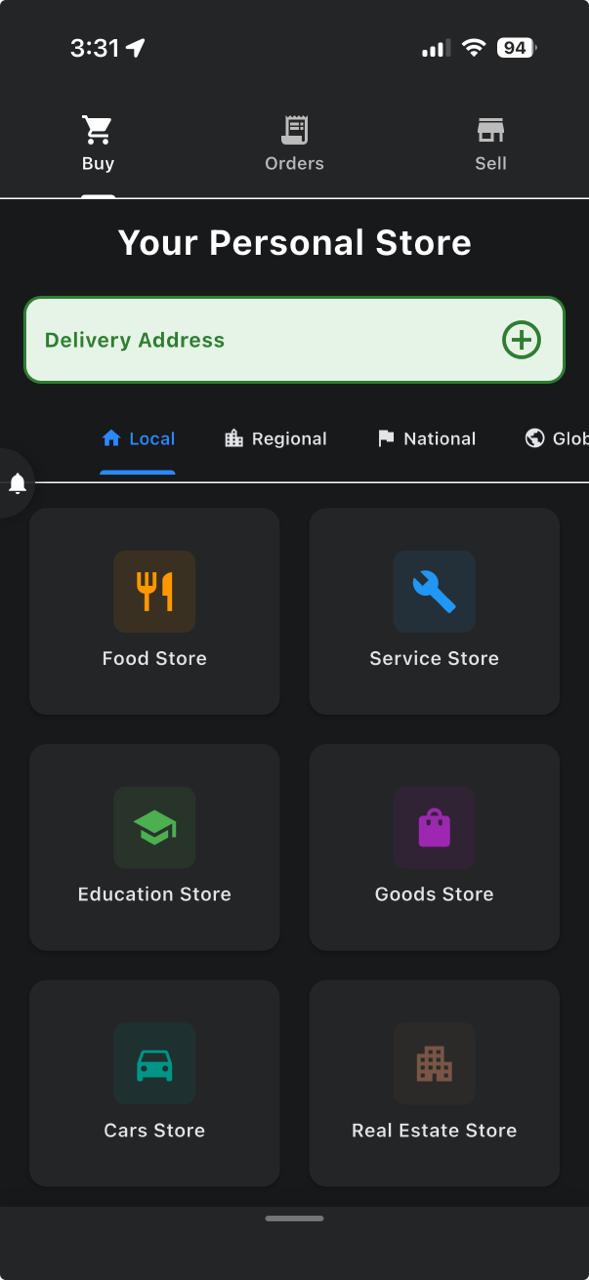
Browsing Products
- Browse by: Rating, Price, Distance, Sales, Date, Category, Condition, Warranty, Shipping, Payment, Availability, etc.
- Filter by geographic level (neighborhood, state, country or global)
- The filters you set are permanent until you remove them, and when a filter is on it will appear as a big chip under the search bar.
Selling Items
- Tap the + button to create a new listing
- Add photos and have AI analyze them and fill the form for you so that only the price is set manually.
- ALL publications have global reach.
- Use the Batch Upload feature to upload multiple products at once. Just upload all the pictures of your products. AI does the sorting for you.
Services Marketplace
- Offer your professional services to your community and beyond, and become the default provider of your service in your zone by getting enlisted in the one-tap service calls.
- Find local service providers with business reviews and trustworthiness ratings.
- Please rate and review completed services to help others make informed decisions.
Buying Items
- Choose your preferred delivery service at checkout. Depending on your location, available services may include FedEx, UPS, DHL, USPS, GoShare, Shippo, ShipEngine, ShipStation, Sendcloud, EasyPost, Estafeta, Redpack, and Airpost.
- Shipping prices are calculated based on the weight and distance of your order. Additional fees may apply for international shipments.
8Emergency Features
Safety N3T provides comprehensive emergency features to keep your community protected. It provides means to get in touch with the community around you when you need it urgently. From simple SOS signals to AI enhanced emergency services, Safety N3T is a suite of tools to help you stay safe and informed during any emergency and in your daily life.
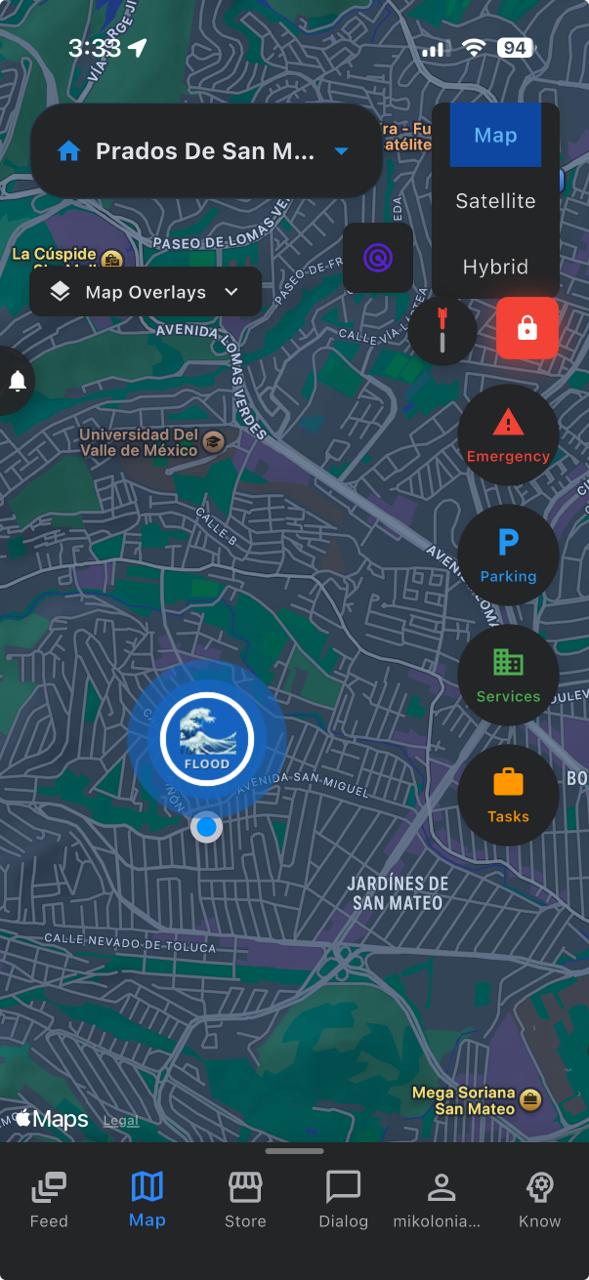
Emergency Alerts
Create alerts to notify your community about urgent situations. Select the appropriate alert type and provide relevant details to help neighbors respond effectively.
- 🚔 Police: AI enhanced 911 calls for assistance of law enforcement. This will create a text transcription of your 911 call and share it with the users that bear the police role. Optionally, you can also share a redacted version of the transcript with the immediate community.
- 🏥 Medical: AI enhanced 911 calls for assistance of medical professionals. This will create a text transcription of your 911 call and share it with the users that bear the Paramedic/EMT role. Optionally, you can also share a redacted version of the transcript with the immediate community.
- 🔥 Fire: AI enhanced 911 calls for assistance of firefighters. This will create a text transcription of your 911 call and share it with the users that bear the firefighter role. NOT optionally, this will share the unredacted transcript of the call with the immediate community.
- 🚨 Armed Attacker: AI enhanced 911 calls for assistance of law enforcement. This will create a text transcription of your 911 call and share it with the users that bear the police role. NOT optionally, this will share the unredacted transcript of the call with the immediate community.
- 🌊 Flood: Warn neighbors about rising water levels, flash floods, or impassable roads. All alert types have a chat window where bystanders can describe the situation and coordinate relief efforts.
- 🌪️ Tornado: Report tornado sightings or warnings in your area. Use the chat window to broadcast the direction of travel of the tornado.
- 🔍 Missing Person: Request help locating a missing individual. This will show a big map marker with the picture, name and last seen location of the person for 21 days.
- ✅ Person Found: Notify the community that a missing person has been located. Update the original alert so search efforts can be concluded.
- 🐕 Missing Pet: Request help locating a missing pet. This will show a big map marker with the picture, name and last seen location of the pet for 21 days.
- 🐾 Pet Found: Report a found pet so the owner can be reunited. Describe the animal and specify where it was found and where it can be retrieved.
- ⚠️ Aggressive Dog(s): Warn neighbors about loose or aggressive dogs in the area. Include location, breed or description, and advise caution for pedestrians and pet owners.
- 🦁 Wild Animal(s): Report wildlife sightings that may pose a danger, such as coyotes, bears, or venomous snakes. Include species, location, and recommended precautions.
- 📦 Object Lost: Request help finding a lost item. Describe the object, its approximate value or importance, and where it was likely lost.
- 📬 Object Found: Report a found item so the owner can claim it. Say what it is but give no details. The owner is required to describe the item in detail accurately to claim it.
- 💨 Gas Leak: Alert neighbors to suspected gas leaks or unusual odors. Include the location and advise evacuation until authorities confirm safety.
- 💧 Water Leak: Report water main breaks, flooding from pipes, or significant leaks. Add the alert while standing near the leak to get a more accurate location.
- 🚗 Traffic Accident: Notify the community about accidents affecting traffic flow. Include the intersection or road segment and whether emergency services are on scene.
- 🕳️ Pothole: Report hazardous road conditions that could damage vehicles or cause accidents. Add the alert while standing near the pothole to get a more accurate location.
SOS Feature
The SOS button sends an immediate distress signal to nearby community members and designated emergency contacts. Your location is shared automatically. This is a premium feature just to prevent abuse. A voice message is required to authenticate the alert and to make the gender of the person in need of help evident.
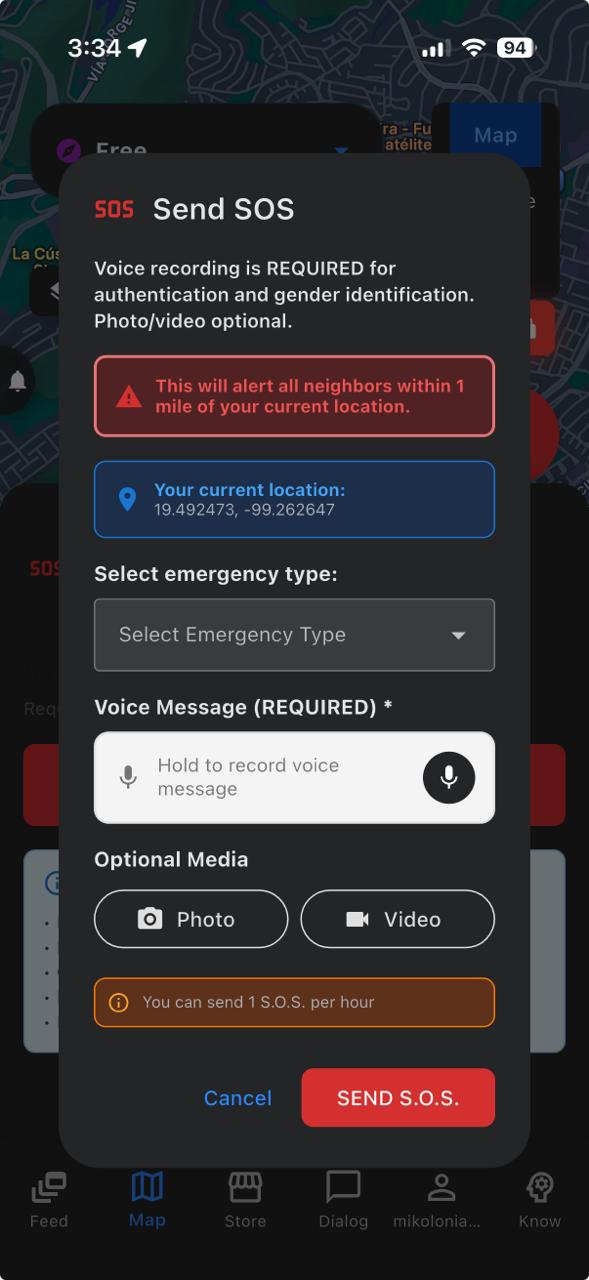
- Select a reason for the alert from the dropdown menu and record a voice message describing the situation.
- Your location and situation will be broadcasted to nearby members.
- Inner circle contacts are notified immediately, but there is no police involved. This alert is for community assistance only. Please use the emergency alerts for police or medical assistance.
9Monitoring Features
Safety N3T includes optional monitoring features designed to provide peace of mind for you and your Inner Circle. These features help ensure your wellbeing while respecting your privacy.
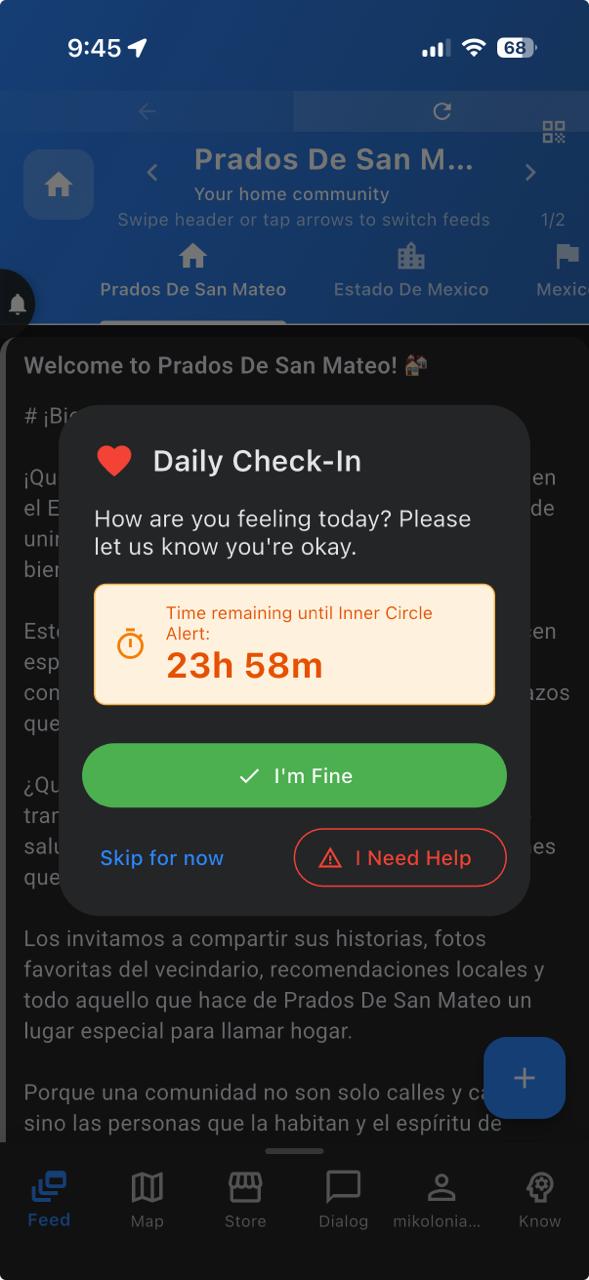
Daily Check-in
The Daily Check-in feature is a wellness verification system that helps ensure you're safe and well each day.
- How It Works: You'll receive a gentle daily prompt asking you to confirm you're okay. A simple tap is all it takes to check in.
- Missed Check-ins: If you miss a check-in, your designated trusted contacts will be automatically notified. This ensures someone is always looking out for you.
- Configuration: You can customize check-in times, choose which contacts to notify, and set the delay before alerts are sent. Find these settings in your Profile under Monitoring Settings.
Unusual Activity Monitoring
This feature can detect unusual patterns in your app usage and location to help identify potential concerns.
- The system learns your normal patterns over time and can detect significant deviations, such as visiting unusual locations or unexpected changes in routine.
- Privacy-respecting approach: Only your Inner Circle contacts will be notified if unusual activity is detected. This feature can be turned off at any time in your Monitoring Settings.
- If unusual activity is detected, your emergency contacts can be notified based on your preferences. You always have full control over what triggers notifications and who receives them.
Zonal Reminders
Zonal Reminders let you create location-based reminders for yourself and selected Inner Circle members. When one of the selected people enters a saved community zone, Safety N3T sends a map notification with your reminder text.
- To create one from Monitoring Settings, open your Usual Places list, long-press a saved community, choose Set Zonal Reminder, select who should receive it, and enter the reminder text.
- You can also open Profile > Zonal Reminders to review your active reminders from the dedicated screen and manage existing ones.
- Each reminder is tied to a specific community and can target yourself, Inner Circle members, or both. From the Zonal Reminders screen, you can edit the reminder text or delete the reminder when you no longer need it.
- When a reminder triggers, it appears as an in-app map notification and as a push alert. Tapping it centers the map on the community and lets the recipient dismiss it for now or unsubscribe from future alerts for that reminder.
Session Logs (Knowledge Page)
The Knowledge page includes Session Logs—a record of your app usage sessions. Here's what you should know:
- What They Are: Session logs record when you open and use the app, including timestamps and general activity types. This creates a timeline of your engagement with Safety N3T.
- Stored Securely in the Cloud: Your session logs are stored securely in your Firebase account, which means they persist across devices and reinstalls. This allows you to detect if someone else has logged into your account from a different device—you'll see their login location and IP address alongside yours.
- Why They're Useful: Session logs let you have certainity that no one else has accessed your account. Unauthorized access is highly unlikely, but if it does happen, it will be immediately visible in your session logs and you will be notified.
- Report Unauthorized Access immediately!: Tap on I don't recognize this login to get the admin team involved ASAP.
Security & Tamper Resistance
Our authentication system is designed to be tamper-resistant, ensuring only you can access your account. Session logs serve as a redundant security measure—an additional layer of protection to be absolutely certain that no unauthorized person can access your data.
- If unusual login patterns are detected in your session logs, you'll be alerted so you can take action immediately.
- This multi-layered approach ensures your Safety N3T data remains truly yours, protected by both technical safeguards and transparent logging.
10Mobility
The Mobility feature enables community-based ride sharing. Request rides from verified community members or offer rides to others.
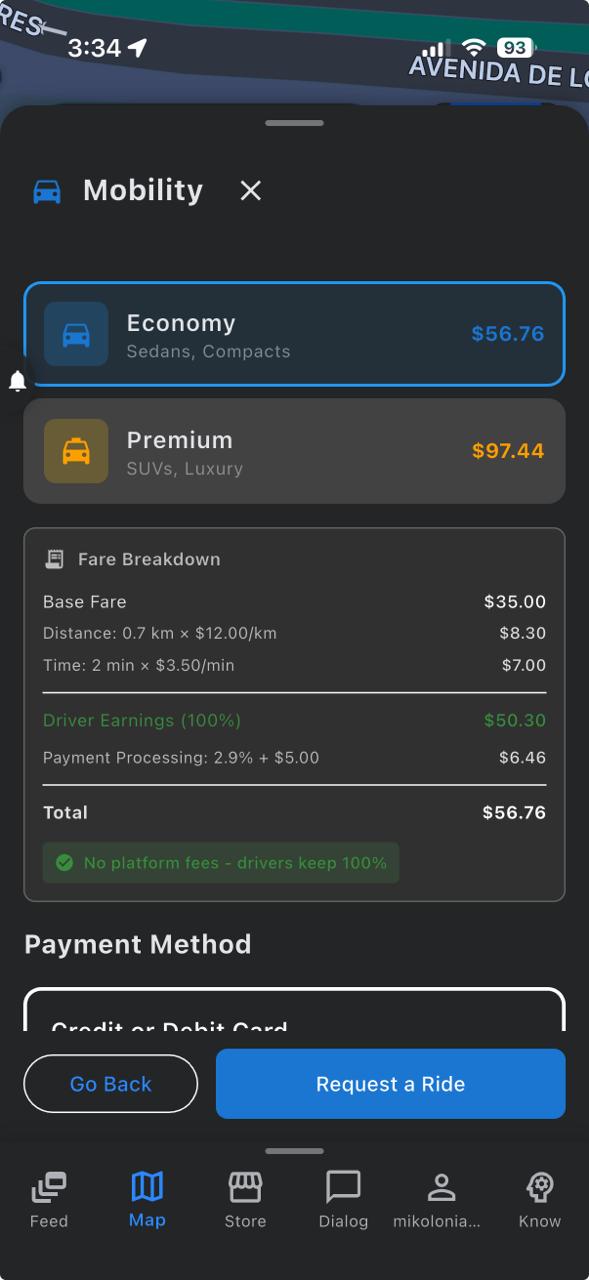
Requesting a Ride
- Open the ride request screen and set your destination.
- Tap the request ride button after agreeing to the price of the ride that is shown after selecting your destination.
- See driver ratings and reviews while you wait for the ride and cancel free of charge during the first 8 minutes.
- Track your ride in real-time on the submap of the ride request screen.
Offering Rides
- Get a mobility driver role and enable it in the mobility section of the community map.
- Set your service mode: You can either be taken anywhere, or restrict your service to rides that take you close to where you are now, or only those that take you back to your home address.
- Accept or decline ride requests. You can also counter a ride request with a higher fare if you feel the fare is too low (just consider this makes you less competitive when ride offers are high).
- That is all, earn money in exchange for rides.
- You choose when the money earned is paid out, just consider that Stripe charges $0.30USD + 2.9% of the amount paid out in every payout.
11Logistics & Delivery
Send packages within your community using the Logistics feature. Community members can deliver packages as they travel, creating an efficient local transportation network.
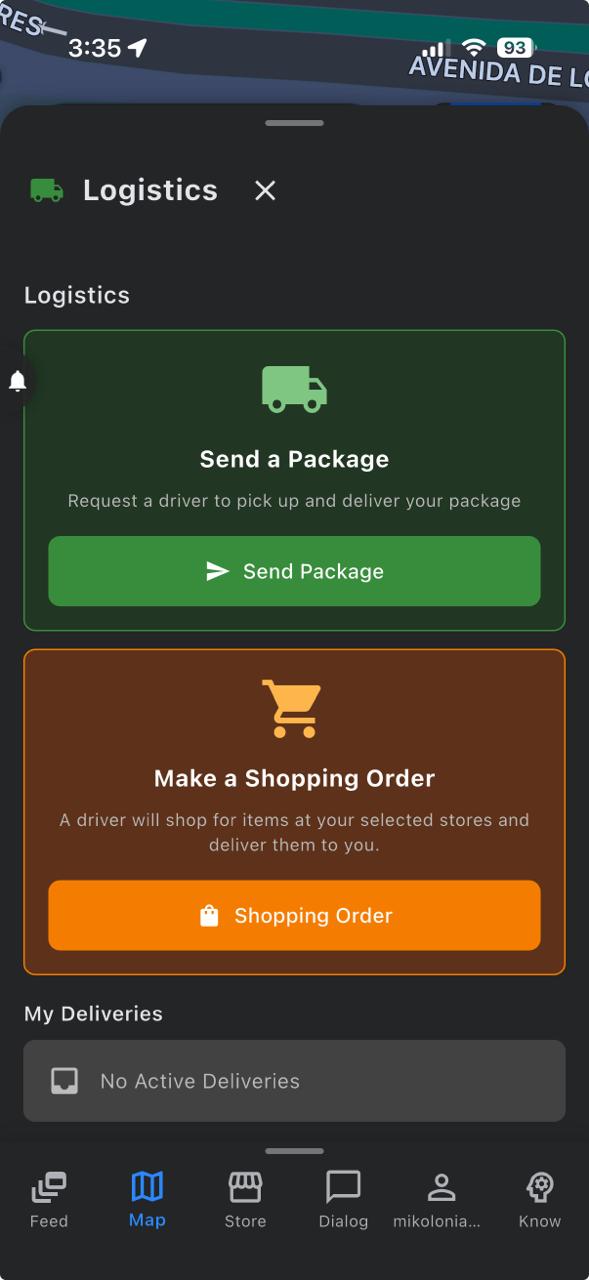
Sending a Package in the Logistics Panel
- Set pickup and delivery locations
- Specify package size and weight, and describe the contents.
- Write recipient name and phone number.
- Track your package in real-time
Make a Shopping Order
- Write down the store name and add it to the list of stores.
- Add items to the shopping cart of each store.
- Wait until you receive service offers from couriers.
- The price proposed by the courier is for the service alone. Only this amount goes through the platform, and the rest is paid in cash at your door.
- Note that there is a cancellation fee that is paid wholly to the courier to cover the cost of returning the items to the stores.
- Courier and customer remain in direct contact during the entire process through the Dialog page.
- The connection is temporary and is removed once the order is completed.
Becoming a Courier
- Request a logistics courier role. Delivery tasks are assigned based on the courier's route and vehicle type.
- View available delivery requests.
- Accept all the deliveries along your route.
- Earn money for your completed deliveries. Remember that you become economically responsible for the package while it is in your care.
12Profile & Settings
The profile information required from you is minimal by design. The only thing that is central to us is the home verification. You will not appear on the map at your home community as a verified user (green marker) until you verify at least one home. Addresses are kept private at all times, so it is through the marker color that the platform lets you know that a user is a verified member of the community. Note that verified users will display a yellow marker when they are outside of their verified home communities and green when they are at home. Unverified users will display a red marker at all times. Unless you promote them to your Inner Circle, because then they will bear a purple marker.
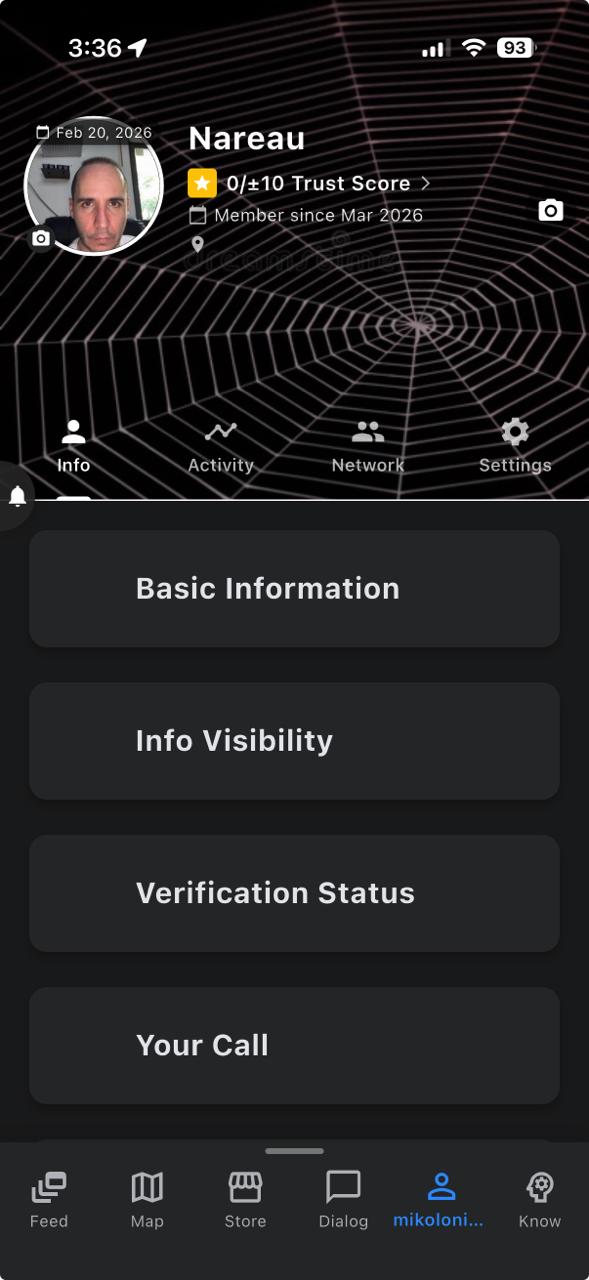
Profile Information
Basic Info, Info Visibility, Verification Status, Your Call, Profession, About me, Skills and Interests.
- Edit your display name and bio / skills / interests (optional).
- Decide who sees your profile data.
- Verify your device, residence, email and face photo.
- Personalize your CALL (can only be done once.)
- Select a map marker that best represents your profession.
Activity
Pending Reviews, Cloud Services Billing, Apple Maps Geocoding Usage, Cost Monitoring & Alerts.
- Review the services / products you received through the app.
- Keep track of your expenses and geocoding calls.
- Set alert thresholds for your spending.
- See what you have been doing lately.
Network
Safety N3T is a context based social network, which means that, if the right permissions are given, you can see other users on the map before you contact them by text, audio, or video call. This can be useful in many ways but it is mainly designed to help you be more timely in your messages or calls, and also to avoid some of the unnecessary communication. In this tab of the Profile Page you can have the peace of mind of obtaining the current location of your Inner Circle members with a single tap. Assign the corresponding permissions to your contacts in the 3 dots menu to enable map visibility and map centering. Note: Map Visibility and Location Centering are independent permissions; disabling map visibility does not automatically disable location centering.
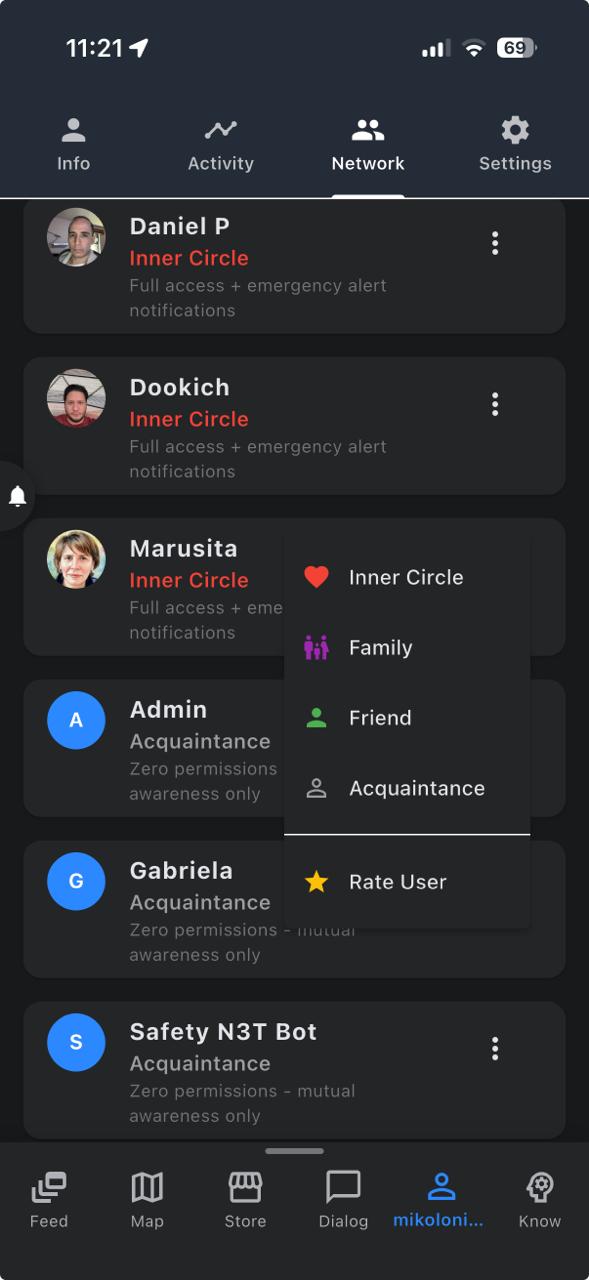
Defensive Mode, Map Visibility, Location Centering, Profile Visibility, Network Permissions.
- Select who can see you or center you on the map.
- Limit who can get in touch with you according to your personal / professional situation.
- Give different permissions tiers to different people.
- Use Defensive Mode to become momentarily invisible to everyone except to your Inner Circle.
Settings
Configure your app experience through the following settings:
- Ads / Free Plan: If you choose the free plan you will be exposed to advertisement weather. It means that the frequency of the ads is controlled by the admin and cannot be changed by the user. If you choose the premium plan you can set exactly how many ads you want to see or set it to zero ads too.
- Notifications: Control which alerts you receive and how or when they appear. Use songs from your library as ring tones for each permission layer. Select your silence hours and permit critical alerts from this control panel (Premium)
- Accessibility: Customize news feed font sizes, styles, and display preferences. Use this panel to personalize your messaging style and app layout. (Premium)
- Monitoring: Configure unusual activity alerts for your Inner Circle and activate daily checkins. (Premium)
- Quick Phrases: Save frequently used text for quick insertion in messages (Premium)
- Feedback: Share suggestions or report issues directly to our team
- Privacy: Enable biometric lock and advanced security options: Messages encryption, Messaging cleanups, Map Privacy, initial speaker state on calls, Location History deletion, Messaging Password. (Premium)
- Language: Select your preferred language for the App.
- Data Clearing: Clear cache, downloads, or reset app data. Is the name of your community wrong? Let us correct it by sending a report in Community Name Diagnostics.
13Knowledge Center
The Knowledge Center helps you understand yourself and your surroundings better. Access insights at multiple geographic levels. See what you have been watching, and make adjustments to the data to steer the behavior of the news feed. Do not ever let an AI algorithm control what you watch again. You are in charge now. Know AND Act!...
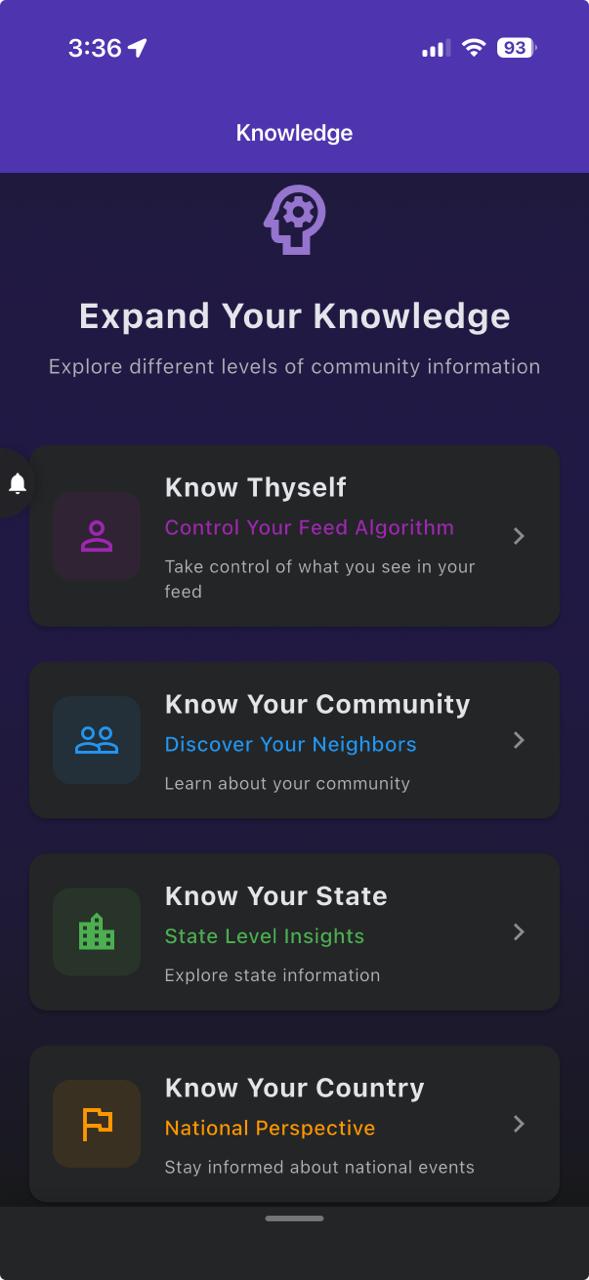
🧠 Know Thyself
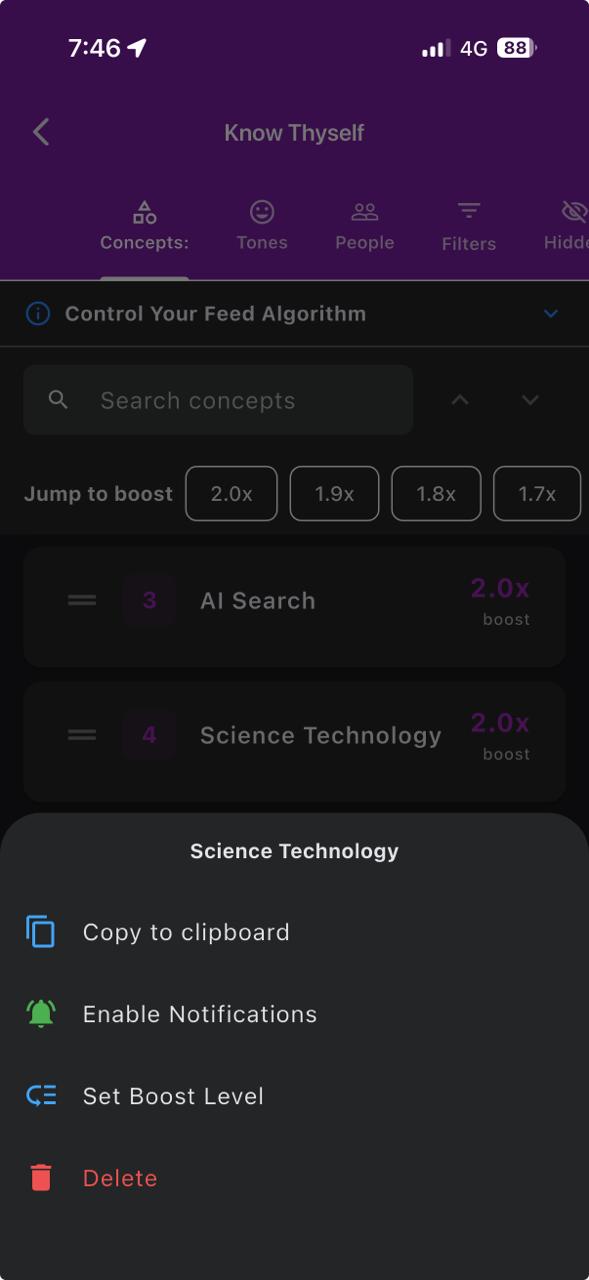
- Concept Boosting: The Concepts tab helps you teach the feed what you want more or less of. Moving a concept higher makes related posts more likely to appear; moving it lower makes them less prominent. This guides the feed instead of simply blocking content.
- Boost levels and quick jumps: Long-press a concept to choose a practical boost level from 0 to 2X. The boost-level bar at the top of the Concepts list lets you jump straight to stronger or weaker boost sections, such as 1.5x or 2.0x.
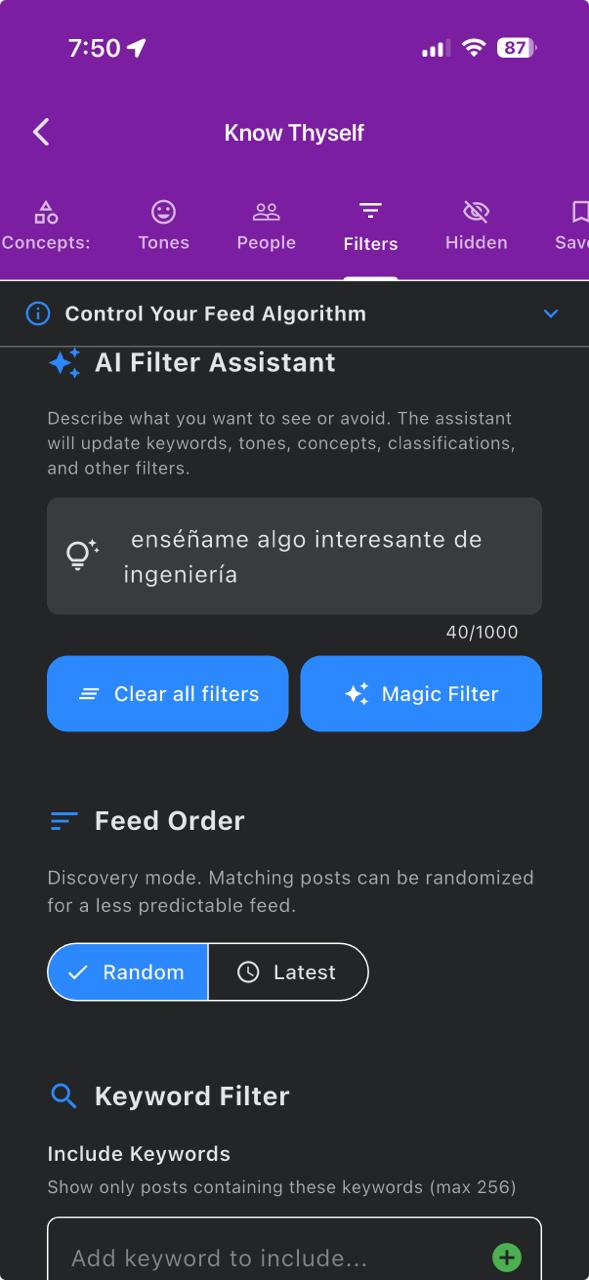
- Copy useful concept names: From the feed hide menu or the Concepts tab, you can copy a concept name to the clipboard. Paste it into Keyword Include or Keyword Exclude when you want a precise search term without retyping it.
- Tones: Each post has an implicit tone that serves as a second classification tool. Use the Tone Boost Control to shape the overall feel of the random feed.
- People: Follow your favorite publishers and get notified when they put posts out. Hidden and Saved are the sections for posts, channels, and concepts you never want to see again or want to revisit later respectively.
- Filters: Use Keyword Include/Exclude Search with copied concept names, tune engagement thresholds, set media type, or select language, country, and video duration with controls to narrow the feed when you need explicit search behavior instead of just boosting.
Remember: Unlike other platforms, YOU have absolute control over what you see in the feed. Adjust your preferences and make the most out of your time. Doomscrolling can be a positive thing if you can steer it consciously and constructively.
👥 Know Your Community
- Concepts: This is what the people that live around you have been seeing in the feed. The list is ranked so that communities can become aware of their collective priorities.
- Tones: Do you live in a chill place or are your neighbors heated all the time. Find out here.
- People: These are your neighbors and their respective badges (if any). Tap on each neighbor to see what they post in their news feed.
🏢 Know Your State
- Concepts: This is what the people that live in your state have been seeing in the feed. The list is ranked so that states can become aware of their collective priorities.
- Tones: Do you live in a chill state or are your state-mates heated all the time. Find out here.
- Communities: These are the communities that other users have discovered in your state. Tap on each community to see them on the map.
🏢 Know Your Country
- Concepts: This is what the people that live in your country have been seeing in the feed. The list is ranked so that countries can become aware of their collective priorities.
- Tones: Do you live in a chill country or are your country-mates heated all the time. Find out here.
- Communities: These are the communities that other users have discovered in your country. Tap on each community to see them on the map.
🔍 Session Logs
- This is a list of your last 20 logins. You do not recognize the location/IP of a login? Report it immediately to have an Admin freeze your Device ID and give you a new one.
- Come in here sporadically to make sure no one is trying to impersonate you or take over your data.
- You will receive a tampering alert when you log in around a familiar location if the system has detected a login from an unfamiliar network in between the familiar log in operations.
📣 Ads Tabs
The Know Your Community, Know Your State, and Know Your Country pages each include an Ads tab, where businesses and members can advertise at the geographic level that fits them best.
- Full transparency before you spend: every ad board displays its viewers-by-day metrics, and when you set up an ad you can see exactly which communities it will reach before you purchase.
- A cleaner alternative to paper flyers: digital ad boards produce no physical waste — nothing to print, hand out, or throw away, and no garbage left behind in your neighborhood.
- Impact you can measure: instead of guessing how many flyers were read before ending up in the trash, you know with certainty how many people actually viewed your advertisement.
14Premium Features
Although you can use Safety N3T for free, it is recommended to use the premium plan instead. Premium membership unlocks various features and removes ads, but it also gives you the right to an Inner Circle. Please support Safety N3T and its mission by purchasing a premium subscription.
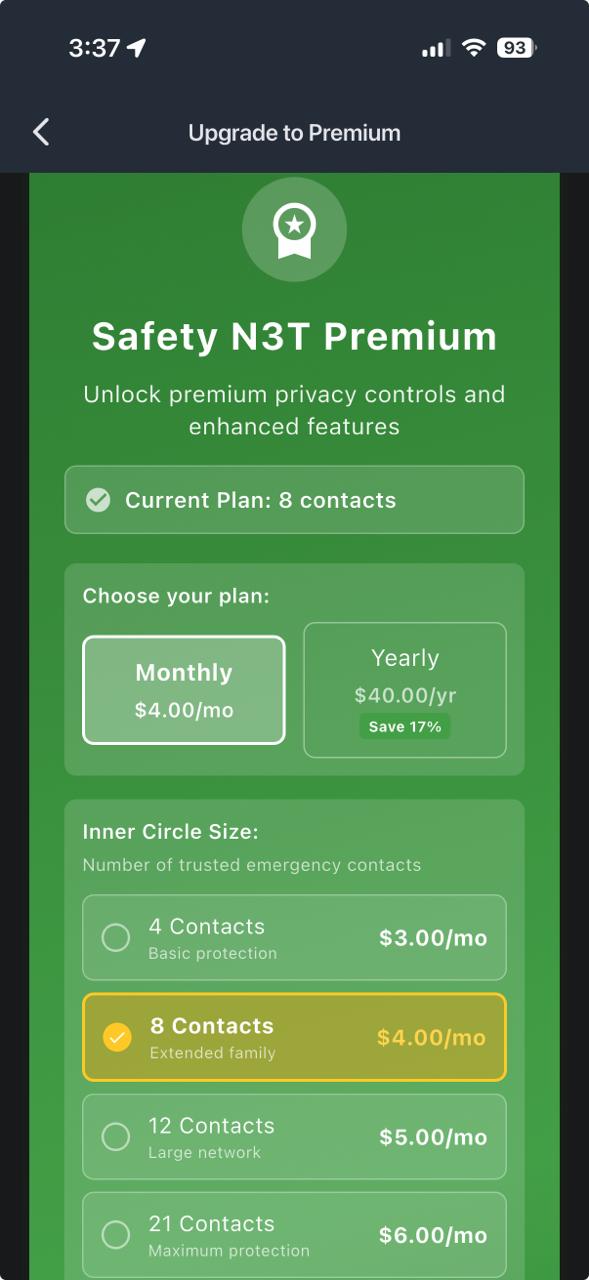
Premium Benefits
- 🚫 Ad-free experience throughout the app
- 👤 Enhanced privacy controls
- 📊 Advanced news feed filters
- ⭐ Premium badge
- 🚨 SOS Alerts Publish Rights
- 💵 Store Listings Publish Rights
- 🛠️ Task Market Publish Rights
- 🅿️ Parking & Storage Publish Rights
- 🪖 Mission Organizer for group trips
- 👔 Profession map marker
- 🗣️ Voice comments in the news feed
- 🚙 Driver Mode Chat (Hands-free)
- 🛡️ Defensive Mode (one tap privacy)
- 🎯 Inner Circle Management features (up to 21 people)
- ⏰ Checkin timer and one tap help request
- Special App Roles for Chef, Service Supplier, Vendor, Driver, Courier, Police, Firefighter, Paramedic, Condo Manager, and Condo Security
Premium subscriptions help fund development and server costs while also keeping the basic app free for everyone. Thank you for your support!
Free Plan and Ads Control
- The Free Plan is activated by selecting 10 interests to enable relevant advertising.
- Premium users can disable ads completely or let a few of them through because they have full ads control, while free users are exposed to advertising weather (admin controlled frequency).
15Upload your Watch History from YouTube / TikTok / Twitch to Safety N3T
Regular users can share watch-history exports with Safety N3T so selected videos from YouTube, TikTok, and Twitch can become available to other users in the community. You only need to obtain the correct file and send it by email with the required subject line.
Obtain your YouTube watch history file
- Visit Google Takeout at https://takeout.google.com.
- Select YouTube and YouTube Music for export.
- From the full YouTube and YouTube Music export, locate the YouTube watch history file named watch-history.html.
- Attach watch-history.html to a new email. If the file is too large, zip it into multiple parts and send the parts by email.
Obtain TikTok and Twitch exports
- TikTok: Open your account privacy settings, request a data download, include your activity or watch-history data, and download the export file when it is ready.
- Twitch: Open your Twitch privacy or account data settings, request your account data download, and download the archive when Twitch provides it.
- Keep the downloaded export or archive exactly as you received it. Do not edit the file before sending it.
- Send one email per platform if you are sharing exports from more than one service.
Send the file to Safety N3T
- Email the file to contact@mikoloniamobile.com.
- Use the exact subject line for the platform: YouTube Watch History, TikTok Watch History, or Twitch Watch History.
- Only send the requested watch-history export. Do not include passwords, account credentials, or unrelated personal files. Imported items are made available in Safety N3T as community content and are not posted back to YouTube, TikTok, or Twitch.
- We confirm that we do not profile users in this process. What exactly do we do with your file? In a completely anonymous way, we extract the information from the file and publish it in the global news feed under a generic Admin account with no location information. We do use a publicity filter that collects vendor identities for the purpose of filtering future posts from the same vendor. The vendor is never connected to your identity; it is only added to a global pool. Our business is your privacy and peace of mind. Please see Our Oath to Fair Play for more details.
16App Roles and the N3T Ecosystem
Safety N3T has three core missions:
- Extend the definition of what a social network should be by opening new forms of interaction that facilitate real support between users.
- Revolutionize the gig economy and online markets into a more viable way to earn a living by removing the middleman.
- Optimize the app's usefulness by keeping a record of users' trustworthiness and favoring users whom others find more reliable.
These three missions are fulfilled by a vision in which users can request special roles inside the N3T ecosystem and operate under etiquette designed to keep interactions safe and frictionless. Roles are requested from the admin, who reserves the right to grant them case by case.
Available roles
The available roles are Chef (Food Provider), Service Supplier, Vendor (Product Supplier), Mobility Driver, Courier, Police, Firefighter, Paramedic/EMT, Condo Manager, and Condo Security. You can select up to two roles at the very top of the Settings tab on the Profile page. Chef, Courier, and Mobility Driver are paid roles that can accumulate income, which may be withdrawn at any time to a Stripe Connect, PayPal, Wise, or Payoneer account. Service Supplier and Vendor are open unpaid roles for users or corporations that want to offer services or products to communities. Police, Firefighter, and Paramedic/EMT are restricted roles that require special authorization through a police department, fire department, or hospital website before they can be granted.
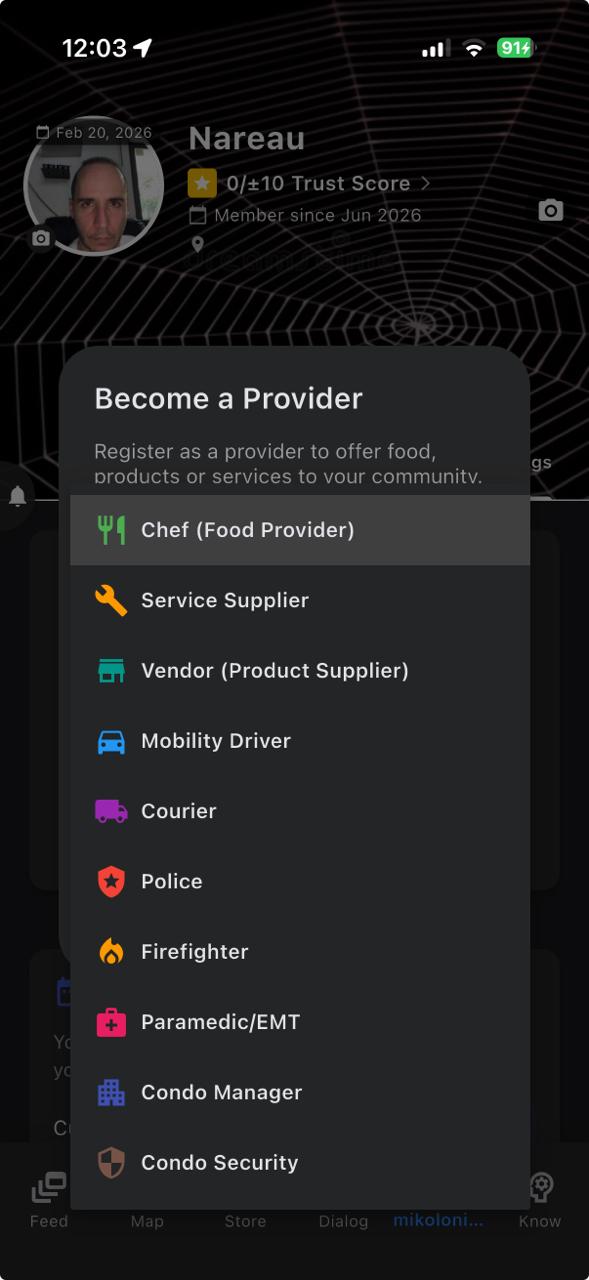
Emergency routing and restricted roles
The app has a routing system that channels emergency reports to Police, Firefighter, or Paramedic/EMT roles depending on the nature of the situation and the relative proximity of those users to the emergency report (see Section 8). These three specific roles are not compatible with a second role, but they will receive a full refund of their membership payment at the end of the month through the payment system, even if that payment was covered by their employer. Thank you for your service.
Screening and authorization
The Mobility Driver role requires a concession from local governments to operate and will be deployed gradually around the world. This role involves intensive screening and requires the requester to agree to a background check. The Chef role also goes through a screening process related to the quality of the food and the condition of the facilities where the food is prepared. Condo roles are restricted and can only be granted if the condo, or the construction company that built it, has a website where access to the roles can be declared.
Reviews and trustworthiness
All roles are subject to reviews that are separate from trustworthiness reviews, so other users can know whether the service or product provided meets customer expectations. This does not exempt role holders from also being subject to trustworthiness reviews like the rest of the users. All roles can and will be removed by the admin after repeated complaints or if the reviews received are consistently below the expected threshold.
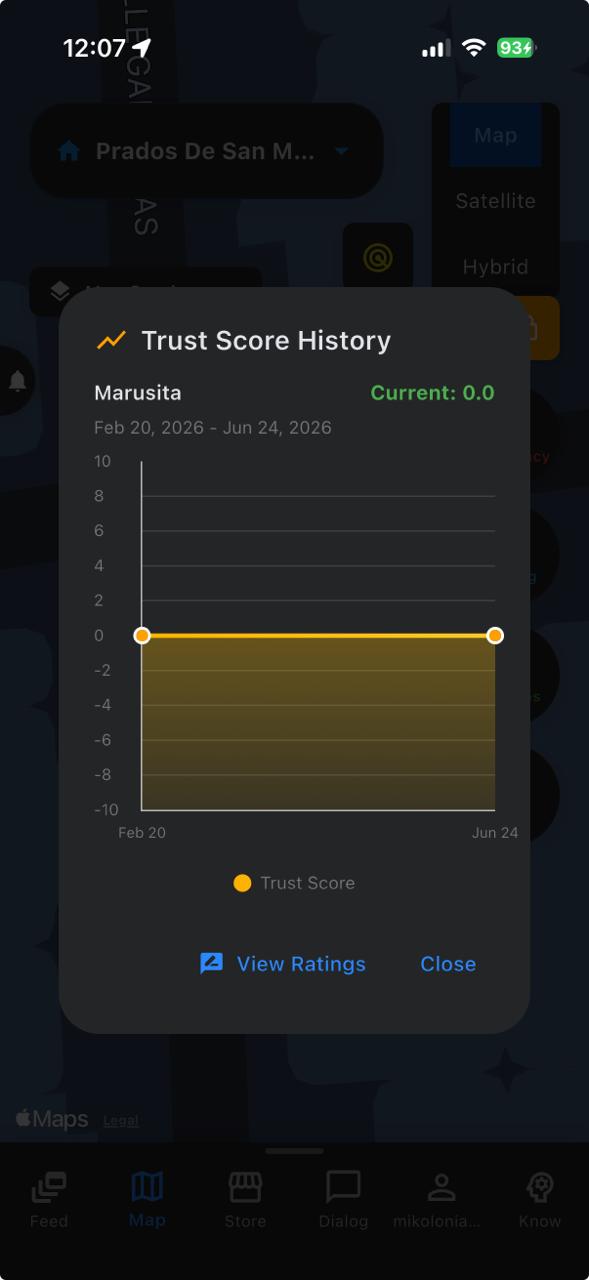
Gigs without a role
Finally, gigs can also be done and paid without a role. These are domestic tasks designed to use cash only, and they can be offered and accepted through the task market. The existing categories are tutoring, pet care, home repairs, elderly care, babysitting, cooking, cleaning, shopping, errands, mechanical jobs, and other tasks. Remember that, beyond putting both sides of the transaction in touch, the app helps keep track of the trustworthiness of the people offering those services. Do not forget to check the trust score and history of workers you hire, or of anyone you meet through the app for that matter.
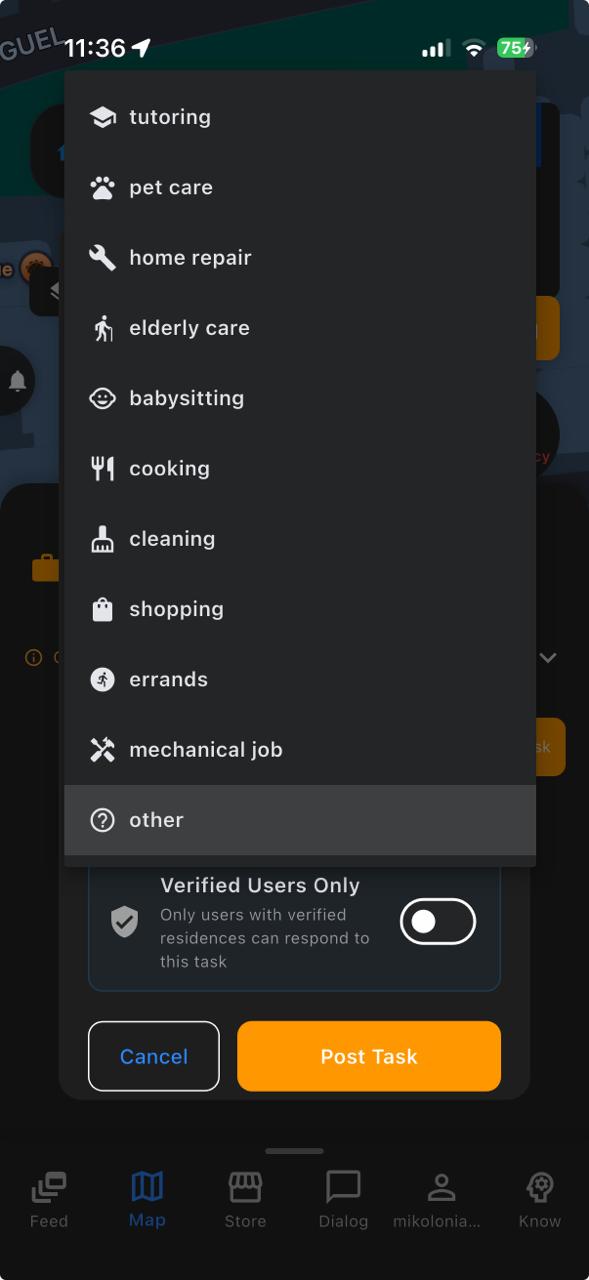
17How the Trust Score Works
The trust score is a public number attached to every user profile. It is designed to summarize how the community perceives you and to help other users decide whether to trust you before a shared ride, a purchase, a task, or an emergency reply. This section explains how the number is produced so counsel, regulators, and users can understand it.
Score range
New accounts start at zero. From there the score can move up or down, but it is always kept inside the range of minus ten to plus ten. It can never go below minus ten or above plus ten, no matter how many ratings you receive.
Peer ratings
Every rating from one user to another moves the recipient's score by one point. A thumbs up adds one point; a thumbs down removes one point. There are no weighted or fractional votes.
Who can rate whom, and when
To be able to rate anyone, you must have a verified email, at least one verified residence, and an account that is at least thirty days old. You cannot rate yourself. For any given pair of users, each type of rating is allowed once per rolling three-hundred-and-sixty-five day window: you can give the same person at most one thumbs up and one thumbs down per year. After you rate someone, you must wait a full three hundred and sixty-five days before giving that same person that same type of rating again.
Reviewing thumbs-down reasons
A thumbs down requires a written reason. Reasons are reviewed by an automated content check before the rating is applied. Reasons that fail the check are rejected and never touch the recipient's score. Thumbs up reasons are shown to the recipient but do not go through this review.
System adjustments
In a limited set of situations, the app itself can add or subtract trust points without a peer rating. This happens when a transaction is properly completed (a small positive adjustment) or when a user abandons or fails to close a transaction (a small negative adjustment). Every system adjustment is recorded with the reason that triggered it. The same minus-ten to plus-ten cap applies.
History and transparency
Every change to the score is stored in a personal history log with the previous score, the new score, the direction and size of the change, and the reason. This lets you audit every movement of your own score inside the app.
What the score does not use
The score is produced only from peer ratings and from the system adjustments described above. It does not use demographic data, precise location, browsing behavior, or payment information as inputs.